Key takeaways
- Budget: compact USB bars such as the GS3 and Leviathan V2 X, with moderate power and one-cable setup.
- Mid-range near the cap: the Stage SE for more output and a remote.
- Premium step-up: 2.1 bars with a subwoofer, such as the Creative Stage and the Razer Leviathan V2, for deeper bass and better movie sound.
For a shallow desk, a USB-powered compact soundbar such as the Creative Sound Blaster GS3 or the Razer Leviathan V2 X is the simplest upgrade over monitor speakers, while the Creative Stage SE suits buyers who want a larger sound from an under-monitor bar with a remote. Which one fits depends on how much space sits below your screen, how you connect, and whether lighting matters. This guide uses the makers’ own listings for the figures and labels anything else as a reviewer report.
Our top picks


As an Amazon Associate we earn from qualifying purchases at no extra cost to you.
Who a PC soundbar is for
A soundbar replaces a left-right pair with one long cabinet that sits in front of or under the monitor. It frees desk space, keeps cables to one run, and often powers from a single USB-C or USB-A connection. The trade-off is stereo separation: a bar only about 40 cm wide cannot spread sound the way two speakers on either side of a monitor can. Several makers add a widening effect to compensate, and reviewers generally describe the result as a clear improvement over built-in monitor or laptop speakers rather than a match for a larger speaker system.
At a glance: compact bars and one step-up
| Model | Key stated specs | Best for | Limits |
|---|---|---|---|
| Creative Sound Blaster GS3 | Maker lists 2 x 6 W RMS (24 W peak), USB audio, Bluetooth 5.4, aux input, headphone output, about 410 mm wide, RGB lighting presets | Small gaming or work desks, multi-platform use | Bluetooth uses SBC only; modest power |
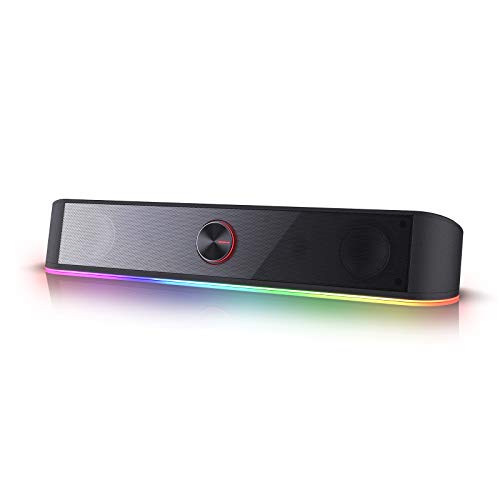
| Razer Leviathan V2 X | Maker lists two full-range drivers and two passive radiators, USB-C power and audio, Bluetooth 5.0, 14 Chroma lighting zones, 400 mm length | Gamers who like lighting and one-cable setup | No subwoofer; wired audio input is USB only |
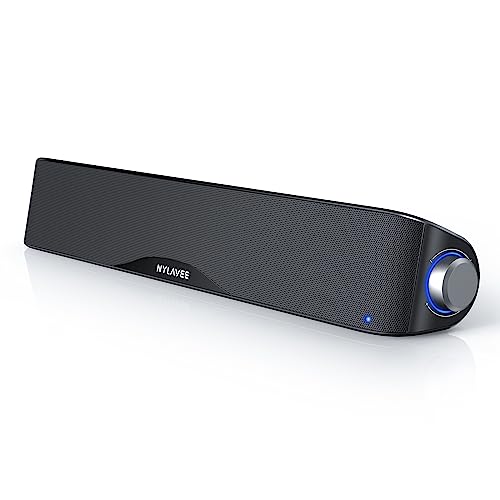
| Creative Stage SE | Maker lists 2 x 12 W RMS, 48 W peak, 55 Hz to 20 kHz, Bluetooth 5.3, USB audio, remote, 410 x 108 x 68 mm | Under-monitor placement, movies and music | No subwoofer; Bluetooth uses SBC only |
| Creative Stage (2.1) | Maker lists 2 x 20 W RMS satellites plus 40 W RMS subwoofer, TV ARC, optical, aux and Bluetooth inputs | TV-and-PC desk where bass matters | Needs floor or desk room for the subwoofer; may sit near or above the cap |
Creative Sound Blaster GS3: the compact value choice
The GS3 is Creative’s small RGB gaming bar. The maker lists 24 W peak power, which works out to two 6 W RMS channels, with a frequency response from 65 Hz to 20 kHz and a stereo-widening mode. Connections are USB audio, Bluetooth 5.4, an aux input and a headphone output. In the box is a 1.5 m USB-C to USB-C cable.
The bar measures 410 by 92.7 by 73.7 mm and weighs about 1 kg, so it fits below most 24-inch and larger monitors. Lighting offers presets such as Chasers, Aurora, Peak Meter, Glowing, Wave and Cycle. The maker lists support for Windows, macOS and several consoles, so confirm yours on the maker page.
Reviewers report it sounds better than laptop or monitor speakers, while the limited power and bass mean it is a desk speaker, not a room speaker.
Razer Leviathan V2 X: lighting and a one-cable setup
The Leviathan V2 X is the smallest bar in Razer’s Leviathan V2 range. The maker lists two full-range drivers and two passive radiators, and a 400 mm length. It is powered and fed audio through a single USB Type-C connection to a PC. Bluetooth 5.0 handles phones and the Nintendo Switch. The maker lists 14 lighting zones using Razer Chroma RGB, controlled through Razer software, and sound modes including music, movie and game.
Choose it if you already use Razer peripherals and want matching lighting. Be aware that there is no subwoofer, so low bass is limited. The larger Leviathan V2 pairs a bar with a subwoofer and spatial audio but is priced in a higher tier than this guide covers.
Creative Stage SE: the under-monitor bar with more output
Where the GS3 is a gaming bar, the Stage SE is a desk-and-TV bar. The maker lists two racetrack-shaped full-range drivers with a passive radiator, 2 x 12 W RMS, up to 48 W peak, a 55 Hz to 20 kHz response, Bluetooth 5.3, USB digital audio and a remote control. It measures 410 x 108 x 68 mm and the maker says it is built to slide under a monitor. Compatibility listed includes PC, Mac, PS4, PS5 and Nintendo Switch.
Reviewers describe the Stage line as a step above the smallest bars for dialogue and music. If you want bass from a subwoofer, the maker also sells the 2.1 Creative Stage with 2 x 20 W RMS satellites and a 40 W RMS subwoofer, plus HDMI ARC, optical and aux inputs.
How to choose: fit, connections and power
Measure the space under your monitor
Most bars here are around 400 to 410 mm wide and 70 to 110 mm deep. Check that your monitor stand leaves enough height. A bar placed too close to the screen can reflect sound off the stand. A bar in front of the screen, below the lower edge, works best at ear level.
Match the connection to your devices
USB audio is the cleanest route for a PC, because the bar handles conversion. An aux input suits laptops and phones. Bluetooth is convenient but several of these bars list only the basic SBC codec, so video can look slightly out of sync. For a TV, look for ARC or optical as listed by the maker.
Think about power, not just peak watts
RMS gives a better picture of sustained loudness. A 12 W RMS total bar will fill a desk but not a living room. If you want movie-night volume, move to the 2.1 option.
Lighting and software
RGB bars let you turn lighting off, and both the Creative and Razer bars provide controls for it. If you dislike lighting, the Stage SE is the calmer design.
Care and safety
Use the supplied cable or a power source that meets the maker’s rating, keep vents unobstructed, and clean with a dry soft cloth. Unplug before cleaning and follow the maker’s manual.
Budget tiers
- Budget: compact USB bars such as the GS3 and Leviathan V2 X, with moderate power and one-cable setup.
- Mid-range near the cap: the Stage SE for more output and a remote.
- Premium step-up: 2.1 bars with a subwoofer, such as the Creative Stage and the Razer Leviathan V2, for deeper bass and better movie sound.
Pick X if…
| If you want… | Pick | Why |
|---|---|---|
| The smallest desk footprint with USB and Bluetooth | Creative Sound Blaster GS3 | 410 mm bar, USB-C audio, aux and headphone output |
| Matching Razer lighting, one USB-C cable | Razer Leviathan V2 X | 14 Chroma zones, USB-C power and audio |
| A remote and slightly more power | Creative Stage SE | 2 x 12 W RMS with remote and Bluetooth 5.3 |
| Movie bass and TV inputs | Creative Stage (2.1) | 40 W RMS subwoofer plus ARC, optical, aux |
| Wider stereo image on a deeper desk | A separate speaker pair | Left and right placement widens the stage |
Alternatives
- Desktop speaker pairs: two small speakers such as the Edifier G2000 (maker lists 8 W + 8 W RMS, Bluetooth, USB and aux) give wider separation if the desk can hold them.
- Edifier R1280DB bookshelf speakers: maker lists 21 W + 21 W RMS with optical, coaxial, RCA and Bluetooth inputs, for buyers who value sound over size.
- Headphones: useful in shared rooms or late sessions.
Frequently Asked Questions
Is a soundbar better than monitor speakers?
Reviewers consistently report that even a compact bar sounds fuller and clearer than built-in monitor or laptop speakers. It will not match a good pair of separate speakers for stereo width, but it uses less space.
Should I connect over USB or Bluetooth?
USB is the better choice at a PC because it carries audio and often power on one cable, and it avoids wireless delay. Bluetooth is handy for phones, but it can lag behind video and several of these bars list only the basic SBC codec.
Do I need a subwoofer with a desk soundbar?
For music and gaming at desk volume, many people do not. A subwoofer matters for films and bass-heavy music, and it needs room. If the desk is small, a compact bar without one is the practical choice.
Will a soundbar work with a game console?
Some do. Some makers list console support on certain bars, and Razer lists Bluetooth for the Switch. Look at the compatibility section on the maker page for your console before buying.
Where should the bar sit?
Put it in front of the monitor stand, centered, with the grille facing you and nothing blocking the front. If the bar sits below your ear level, tilt the front up slightly if the design allows.
Can I turn off the lighting?
The RGB bars listed here let you change or disable lighting through a button or software. The Creative Stage SE has no lighting emphasis, so it suits a quieter desk.