Key takeaways
- Size and power: RMS power in watts is the continuous rating. Peak figures are higher and less meaningful. Small speakers with 2.5W per side suit a nearfield desk; more power gives headroom for a bigger room.
- Inputs: A USB sound card input avoids using your computer’s audio jack, a 3.5mm AUX input suits consoles and phones, and Bluetooth is convenient for casual listening.
- Controls: A physical volume knob within reach beats software volume. Mode buttons for Game, Music and Movie presets are useful if the tuning is sensible.
- Lighting: RGB is decoration. If you do not want it, choose a model where you can disable it.
- Placement: Position speakers at ear height, angled toward you, a short distance away from walls, and keep them away from monitors with magnetic sensitivity concerns, following the maker’s manual.
For a typical desk under $100, the Edifier G2000 is the stronger gaming speaker pair for people who want more output, Bluetooth and a USB sound card input, the Edifier G1500 is the compact, cheaper pair for small desks and handheld or laptop use, and the Edifier MR4 suits anyone who cares more about accurate music and movie sound than about RGB lighting. This guide explains what to look for in desktop gaming speakers, what the maker states for each model, and how to fit them to your desk.
Our top picks

As an Amazon Associate we earn from qualifying purchases at no extra cost to you.
What matters in gaming speakers
Speakers differ from headsets in one important way: positional accuracy is weaker, but comfort, immersion in single-player games and film or music playback are better. The features below decide whether a pair is a good match.
- Size and power: RMS power in watts is the continuous rating. Peak figures are higher and less meaningful. Small speakers with 2.5W per side suit a nearfield desk; more power gives headroom for a bigger room.
- Inputs: A USB sound card input avoids using your computer’s audio jack, a 3.5mm AUX input suits consoles and phones, and Bluetooth is convenient for casual listening.
- Controls: A physical volume knob within reach beats software volume. Mode buttons for Game, Music and Movie presets are useful if the tuning is sensible.
- Lighting: RGB is decoration. If you do not want it, choose a model where you can disable it.
- Placement: Position speakers at ear height, angled toward you, a short distance away from walls, and keep them away from monitors with magnetic sensitivity concerns, following the maker’s manual.
At a glance
| Model | Type | Key stated specs | Best for | Limits |
|---|---|---|---|---|
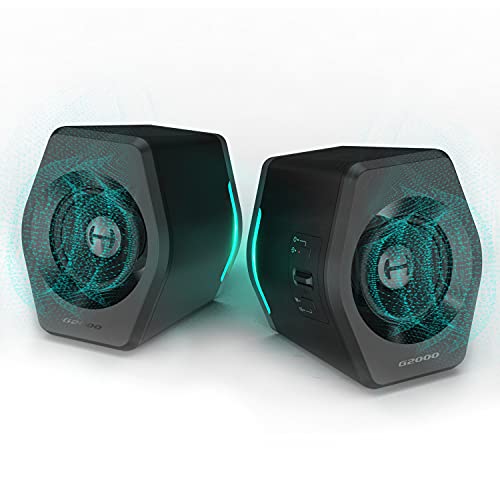
| Edifier G2000 | 2.0 gaming desktop speakers | 8W+8W RMS output (peak figures differ between listings), 2.75 inch drivers, 98Hz to 20kHz, Bluetooth, USB sound card and 3.5mm AUX inputs, Music, Game and Movie modes, 12 RGB effects | Desk gaming with extra volume and flexible inputs | No dedicated subwoofer, bass starts at 98Hz |
| Edifier G1500 (Hecate) | 2.0 compact gaming speakers | 2.5W+2.5W RMS, 5W+5W peak, 2.5 inch full-range drivers, 93Hz to 20kHz, 80dB SNR, Bluetooth 5.3, USB sound card, AUX, 104 x 168 x 115mm, 0.98kg | Small desks, laptops and consoles | Lower output, limited bass |
| Edifier MR4 | 2.0 powered monitors | 1 inch silk dome tweeter, 4 inch woofer, 21W+21W, 60Hz to 20kHz, TRS balanced, RCA and 3.5mm inputs, front headphone jack, Monitor and Music modes, MDF cabinets | Accurate music, video editing, gaming with a flat sound | Typically sold above this cap, no Bluetooth listed, larger footprint, no RGB |
Edifier G2000: more output and more inputs
Edifier’s spec table lists the G2000 with 8W per side of continuous output and 2.75 inch full-range drivers; peak figures vary between listings, so rely on the RMS number. The stated frequency response is 98Hz to 20kHz. Inputs are Bluetooth, a USB sound card and a 3.5mm AUX connection. It offers three sound modes, Music, Game and Movie, and 12 customizable RGB lighting effects that can be cycled through or switched off.
It is the stronger choice if you want a louder, fuller sound on a desk and the ability to connect a PC, a phone and a console. The 98Hz low end means you will not feel deep bass from the speakers alone, so people who want rumble in action games may prefer to add a subwoofer or choose different speakers. For most desk setups where the speakers sit within an arm’s reach, the output is more than enough.
Edifier G1500 (Hecate): compact and wireless
The G1500 is branded by Edifier as Desktop Gaming Speakers Pro 2.0. It has a 2.5 inch full-range driver per side, 2.5W+2.5W RMS with 5W+5W peak, a frequency response of 93Hz to 20kHz and an 80dB signal-to-noise ratio. Edifier lists Bluetooth 5.3, 3.5mm AUX and USB sound card inputs, compatibility with PC, Mac, PS4, laptops and phones, and EQ presets for Game, Music and Movie. It has 12 RGB lighting effects and a hexagonal body that measures 104 x 168 x 115mm and weighs 0.98kg, with a 1.5m cable.
The G1500 fits when desk space is tight or when you want a speaker pair to move between a laptop and a console. Power is modest, which suits nearfield listening but not filling a large room. If you want volume or bass depth, the G2000 is a better value in that sense.
Edifier MR4: the neutral alternative
The MR4 is a studio-monitor style pair rather than a gaming speaker, but it appears on gamers’ lists because of its sound. Edifier lists a 1 inch silk dome tweeter and a 4 inch woofer, 21W+21W of output, a frequency response of 60Hz to 20kHz, MDF cabinets, TRS balanced, RCA and 3.5mm AUX inputs, and a front-mounted headphone jack. A multi-function knob handles power, volume and sound effect toggling, and two modes are offered: Monitor mode, indicated by a red light, for a reference-style sound, and Music mode, shown in green, for an enhanced sound.
The inputs mean you will usually connect from the back with a cable, and Bluetooth is not listed. The MR4 suits people who use their PC for gaming, music and video work, who value a balanced presentation and who have space for larger cabinets. It has no RGB and no USB sound card input listed, so a PC’s line output or an external DAC is the usual feed.
Fit, connection and care notes
- Desk depth: The G1500 is compact. The MR4 is a bookshelf-class pair, so measure your desk and monitor stand first.
- USB sound card input: On the G2000 and G1500, plugging in via USB uses the speaker’s built-in converter. That avoids a noisy PC headphone jack.
- Cables: Balanced TRS connections on the MR4 reduce interference, but only when your source has a matching output. A 3.5mm-to-RCA cable works for most PCs.
- Ventilation and power: Keep the speakers free of clutter, use the supplied power cable and follow the manual for any electrical concerns.
- Cleaning: Dust with a dry, soft cloth. Avoid spraying liquids near the drivers.
Pick X if you need Y
| If you… | Pick | Why |
|---|---|---|
| Want the loudest, most flexible gaming pair here | Edifier G2000 | 8W+8W with Bluetooth, USB and AUX |
| Have limited desk space | Edifier G1500 | Compact 104 x 168 x 115mm body |
| Also edit video or listen to a lot of music | Edifier MR4 | Monitor mode and a wider frequency range |
| Need a front headphone jack | Edifier MR4 | Listed front-mounted jack |
| Want Bluetooth for a phone | Edifier G2000 or G1500 | Bluetooth listed on both |
Budget tiers inside the cap
The G1500 is the budget tier and the G2000 sits above it with more power. The MR4 is a studio-monitor pair that is typically sold above this cap, so treat it as a stretch option. Within a $100 limit you do not get a true subwoofer-equipped system, so expectations should be realistic: these are nearfield speakers that fill a desk, not a living room. If bass impact is a priority, a headset or a separate small subwoofer is the better route.
Setting them up well
Good placement does more than a small increase in power. Form a rough triangle between the two speakers and your head, aim the tweeters at ear level, and keep the left and right speakers the same distance from you. Choose the Game mode when you want footsteps and effects emphasized, the Movie mode for film and cutscenes, and the Music mode for playlists, then leave the one you prefer and stop switching. If you hear hiss at low volume, lower the source volume on the computer a little and raise the speaker knob instead, or switch to the USB input.
Alternatives
- Creative Pebble family: Creative’s Pebble V3 and Pebble Pro are small USB-C powered 2.0 speakers that suit very small desks. Compare their listed power and inputs against the Edifiers.
- Edifier R1280DB: A larger bookshelf pair with Bluetooth and digital inputs, aimed at general home audio; confirm its listing against your budget.
- A soundbar: Saves desk space and sits under a monitor, but stereo separation is narrower.
Frequently Asked Questions
Are speakers or a headset better for gaming?
Headsets give clearer positional cues and avoid disturbing others. Speakers feel more natural for long single-player sessions and are better for music and movies. Many players use both.
Do I need a subwoofer?
Not for a desk setup, though small speakers lack deep bass. The G2000 lists bass response from 98Hz and the G1500 from 93Hz. The MR4 lists 60Hz, so it reaches lower on its own.
What is the difference between RMS and peak power?
RMS is the continuous output a speaker can sustain. Peak describes short bursts. Edifier lists RMS for the G models, and the RMS number is the more useful one for comparison.
Can I use them with a console?
Yes, through the 3.5mm AUX input where available, provided your console has an analog or headphone output. The G1500 lists PS4 compatibility. A console’s optical output needs a converter.
Will the RGB lighting drain anything or distract me?
The G2000 and G1500 list effects that can be cycled or turned off. If you prefer no lighting, use the off option or choose the MR4, which has none.
Where should I place the speakers?
Place them at ear height, left and right of the monitor, angled toward you. Keep them clear of walls for tighter bass, and follow the maker’s guidance on spacing from displays.