Key takeaways
- Do you need a microphone path? Many hi-fi-style DACs only handle playback. If your headset has separate headphone and microphone plugs, you need a device with a mic input, or you will have to run the mic into a different port.
- What are you plugging it into? A PC accepts nearly anything. A console or handheld needs a device that works in a basic class-compliant USB mode without drivers.
- What do your headphones need? Low-impedance gaming headsets are easy to drive. Open-back or studio headphones at 80 ohms and above benefit from the higher output stages on the larger units.
For most gamers shopping under $150, the Fosi Audio K5 Pro is the simplest desktop gaming DAC because it is the only model in this group whose maker lists a microphone input, while the FiiO KA13 suits people who want a pocket-sized dongle with real power, the FiiO K11 suits anyone driving harder-to-power wired headphones at a desk, and the FiiO KA11 is the cheap plug-and-play option for consoles and handhelds. The rest of this guide explains what a gaming DAC actually changes, which stated specs matter, and how each of these four current models fits different setups.
Our top picks



As an Amazon Associate we earn from qualifying purchases at no extra cost to you.
What a gaming DAC does and does not do
A DAC (digital-to-analog converter) with a built-in headphone amplifier replaces the audio circuitry on your motherboard, laptop or console controller. The benefits are practical rather than magical: a cleaner and louder signal for wired headphones, a physical volume control, and the ability to drive headphones with higher impedance that a laptop jack struggles with. It does not make a poorly tuned headset sound like a different product, and it will not add surround sound by itself unless the device specifically includes virtual surround processing.
For gaming, three questions decide the purchase more than any decoding chip name:
- Do you need a microphone path? Many hi-fi-style DACs only handle playback. If your headset has separate headphone and microphone plugs, you need a device with a mic input, or you will have to run the mic into a different port.
- What are you plugging it into? A PC accepts nearly anything. A console or handheld needs a device that works in a basic class-compliant USB mode without drivers.
- What do your headphones need? Low-impedance gaming headsets are easy to drive. Open-back or studio headphones at 80 ohms and above benefit from the higher output stages on the larger units.
At a glance
| Model | Form | Best for | Key stated specs | Limits |
|---|---|---|---|---|
| Fosi Audio K5 Pro | Desktop box | Headsets with separate mic plug, PC and console desk setups | Inputs: USB-C, optical, coaxial, 3.5mm mic. Outputs: 3.5mm headphone, RCA. USB up to 24-bit/96kHz per the manual summary (some reviews say 192kHz). 1000mW at 16 ohm, 80mW at 300 ohm. Bass and treble knobs | No balanced output. USB resolution tops out at 96kHz |
| FiiO K11 | Desktop box | Higher-impedance wired headphones, hi-fi plus gaming | Up to 1400mW balanced at 32 ohm per the maker. USB-C, optical, coaxial inputs. 4.4mm balanced and 6.35mm outputs, RCA line-out. PCM 384kHz/32-bit, DSD256 as listed. 147 x 133 x 32.3 mm | Spec list shows no microphone input. Larger footprint |
| FiiO KA13 | USB-C dongle | Portable power for phone, laptop, handheld | Dual CS43131. 550mW balanced and 170mW single-ended at 32 ohm. 3.5mm and 4.4mm outputs. PCM 384kHz/32-bit, DSD256. About 18.5g | Spec list shows no microphone input. Control app availability varies by platform |
| FiiO KA11 | USB-C dongle | Cheapest route to plug-and-play on consoles and handhelds | Supports UAC1.0 mode. Hi-Res Audio certified. App control available | Lower output than the KA13. Detailed figures are thinner on the maker page |
Fosi Audio K5 Pro: the gaming-first desktop box
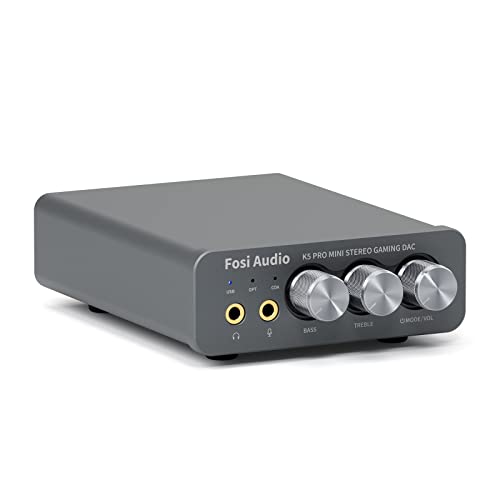
The K5 Pro is built around a gaming scenario. According to the maker, it adds a microphone input compared with the earlier Q4 model, so a headset with two 3.5mm plugs can keep its mic connected through the same unit while the audio travels over a single USB-C cable. The stated inputs are USB-C, optical, coaxial and the 3.5mm mic jack, with a 3.5mm headphone output and RCA outputs for powered speakers.
Power figures are listed against impedance, which is the useful way to read them: 1000mW at 16 ohms, 500mW at 32 ohms, 300mW at 64 ohms, 150mW at 128 ohms and 80mW at 300 ohms. The recommended headphone range is 16 to 300 ohms. That is plenty for typical gaming headsets and for most mid-impedance wired headphones, though it is not aimed at the very hardest-to-drive models. The front panel also has bass and treble controls, a master volume knob and an input mode switch.
Two limits are worth knowing. USB audio is listed at 24-bit/96kHz in the manual summary, though some reviews quote 192kHz, so confirm on the maker page. For gaming that is comfortably more than game audio uses. Reviewers and the manual note that the microphone path works only over USB; if you route sound through the optical or coaxial inputs, plan on a separate microphone solution. This model sits in the budget tier of this cap.
FiiO K11: power and outputs for a desk
The K11 is the choice when headphones matter as much as the game. FiiO lists up to 1400mW from the balanced output into a 32 ohm load. Inputs are USB-C, optical and coaxial. Outputs include a 4.4mm balanced jack, a 6.35mm single-ended jack, an RCA line-out and a coaxial output. File support is PCM up to 384kHz/32-bit and DSD256.
The listed footprint is 147 x 133 x 32.3 mm with a weight of about 407g. The listed specs do not mention a microphone input, so pair it with a headset that has a USB or standalone microphone, or with a desk mic. In practice that makes it better for people who game with a separate microphone, or who also listen to music and movies on good wired headphones, than for those who need a one-box headset adapter. It falls in the mid-range of this budget.
FiiO KA13: dongle form with desktop-style output
The KA13 packs dual CS43131 DAC chips into a body of roughly 56.3 x 22 x 10.5 mm and about 18.5g. The maker lists up to 550mW from the 4.4mm balanced output and 170mW from the 3.5mm single-ended output at a 32 ohm load with its desktop mode on, and lower figures with it off. It supports PCM up to 384kHz/32-bit and DSD256, and the small RGB window shows the sampling frequency in use.
It connects over USB-C, with adapter cables varying by package, so it can travel between phone, laptop and handheld PCs. As with the K11, the spec list does not show a microphone input, so it is a playback upgrade. It makes the most sense for handheld PC gaming, mobile gaming with wired headphones, or a laptop that is moved around often. Because it is small, it draws power from the host device, which matters for phones and handhelds with limited battery.
FiiO KA11: the plug-and-play budget dongle
FiiO’s announcement for the KA11 describes a compact, lightweight dongle with more power than its predecessor, the KA1, Hi-Res Audio certification, and app control. The detail most relevant to gamers is that it supports UAC1.0 mode, which is the basic class-compliant USB mode that devices without full driver support, such as many consoles and handhelds, are generally happier with. The maker page is light on numerical output figures, so treat it as a straightforward upgrade for earbuds and easy-to-drive headphones rather than a way to power demanding ones. It belongs to the budget tier.
Compatibility and fit notes
- Consoles: Choose a model with a basic USB class mode. The KA11 lists UAC1.0 support. Whether a console sends chat audio through a given dongle depends on the console, so read the manual before relying on voice chat through a DAC with no mic function.
- Surround formats: Digital inputs generally expect plain PCM audio rather than encoded Dolby or DTS. Set the output format on the source device accordingly if you hear static or silence, and note that the K5 Pro microphone path does not work through the optical or coaxial inputs.
- Speakers: The K5 Pro and K11 both offer RCA line outputs for powered speakers; neither is designed to drive passive speakers directly.
- Desk space: The K11 and K5 Pro are about the size of a thick paperback. Dongles disappear behind a laptop.
- Cables: Balanced 4.4mm outputs only help if your headphones have a balanced cable. Most gaming headsets do not, so do not pay for that feature unless you own compatible headphones.
Pick X if you need Y
| If you… | Pick | Why |
|---|---|---|
| Use a headset with separate mic and headphone plugs on PC | Fosi Audio K5 Pro | Maker lists a 3.5mm mic input and USB mic path |
| Own high-impedance wired headphones | FiiO K11 | Highest listed output of the group and a balanced jack |
| Game on a handheld PC or phone | FiiO KA13 | Small, balanced and single-ended outputs, cables for several ports |
| Want the lowest-cost upgrade for a console or Switch-style device | FiiO KA11 | UAC1.0 mode and a compact body |
| Want speakers plus headphones from one source | Fosi Audio K5 Pro or FiiO K11 | Both have RCA outputs |
Budget tiers inside the $150 cap
The budget tier is where the K5 Pro and KA11 sit, and for the large majority of wired gaming headsets they deliver everything a DAC can usefully add. The mid-range part of the cap is where the K11 and KA13 live; the extra cost buys balanced outputs, more headroom, bigger file support and nicer controls, none of which changes how a typical headset sounds in a shooter. If your headphones are easy to drive and your priority is voice chat, the budget tier is the sensible stopping point.
Alternatives worth considering
- Creative Sound Blaster models: Creative sells USB sound devices with surround processing and microphone inputs. They suit players who want virtual surround and onboard software, though the software ecosystem is tied to Windows and Mac.
- A headset with its own USB connection: If your headset already has a USB cable and decent amp, a separate DAC adds little.
- A small audio interface: If you also record a microphone with an XLR connection, an interface with a headphone output can replace a DAC. See our audio interface guide for that route.
Frequently Asked Questions
Is a gaming DAC worth it for competitive play?
It can be if your current source is noisy, quiet or distorted, because a clean, louder signal and a hardware volume knob are real quality-of-life improvements. It will not by itself make enemies easier to locate; that depends on the headphones and the game’s audio mix. Treat it as a way to remove weaknesses in your source.
Will a DAC work with a PlayStation or Xbox?
Some do, depending on the console and the USB mode of the device. FiiO lists UAC1.0 support for the KA11, which is the mode most often needed. Consoles can be restrictive about USB audio devices, so read the console section of the maker’s manual before buying.
Do I need balanced output?
Only if your headphones use a balanced 4.4mm cable. Most gaming headsets use a standard 3.5mm plug and will not benefit. Balanced outputs mainly raise the available power for headphones that are designed for them.
Can a DAC replace my headset’s microphone?
No. A DAC handles audio output. Among the models here, only the K5 Pro lists a microphone input, and that input passes your headset’s existing mic through rather than improving it. For better voice quality you need a better microphone.
Is DSD or 384kHz support useful for gaming?
Not for games, which are mixed at far lower resolutions. These formats matter for music files. If you only game, treat them as headroom rather than a reason to buy.
Will it reduce latency?
The devices here are not marketed as latency solutions, and none of the maker pages quote latency figures. Wired USB audio is generally low-latency on any of them, so the choice should rest on inputs, power and fit.