Key takeaways
- Budget: The Logitech Z313 and similar wired 2.1 sets give bass and simplicity but few inputs.
- Mid-range near the cap: The Creative T100 and Edifier G2000 add Bluetooth, USB and presets in a compact body.
- Premium step-up: The Edifier R1280DB moves toward fuller sound at a higher outlay.
For most desks, a compact 2.0 pair with several inputs such as the Creative T100 is the safest choice under $100, a 2.1 set with a subwoofer such as the Logitech Z313 suits buyers who want bass for movies and games, and the Edifier G2000 fits gamers who want lighting and a USB sound card built in. The picks below come from the makers’ own product listings, with reviewer opinions flagged as such. Where a maker page did not state a figure, this guide leaves it out instead of guessing.
Our top picks


As an Amazon Associate we earn from qualifying purchases at no extra cost to you.
Quick answer: which speakers for which desk
Budget computer speakers trade size, bass and connections against each other. A small pair keeps the desk clear but gives up low-end weight. A 2.1 set adds a subwoofer that needs floor or desk space. A powered pair with a USB input can bypass a weak laptop headphone jack. Decide first how you connect, then how much room you have, then how loud you listen.
At a glance: the shortlist
| Model | Type | Key stated specs | Best for | Limits |
|---|---|---|---|---|
| Creative T100 | 2.0 powered pair | Maker lists 2.75-inch full-range drivers, up to 40 W RMS, Bluetooth 5.0, 3.5 mm, optical and USB inputs, plus a remote | All-round desk music, TV and light gaming | Bluetooth uses only the basic SBC codec; reviewers report some wireless lag with video |
| Edifier G2000 | 2.0 gaming pair | Maker lists 8 W + 8 W RMS, 2.75-inch drivers, Bluetooth, USB sound card and 3.5 mm input, 98 Hz to 20 kHz, 12 lighting effects, three sound modes | Gaming desks, small spaces, colourful setups | Cables are fixed and not detachable; modest bass; sits at the top of the budget cap |
| Logitech Z313 | 2.1 with subwoofer | Maker lists 25 W RMS and 50 W peak, 3.5 mm input, wired control pod with headphone jack | Bass-focused movies and games on a tight budget | Wired only, no Bluetooth, no digital input |
| Edifier R1280DB | Bookshelf pair | Maker lists 21 W + 21 W RMS, 4-inch mid-bass drivers, optical, coaxial, RCA and Bluetooth inputs, 55 Hz to 20 kHz | Listeners who want fuller sound and several sources | Larger, heavier and usually above this budget cap on the maker’s own store |
Creative T100: the flexible all-rounder
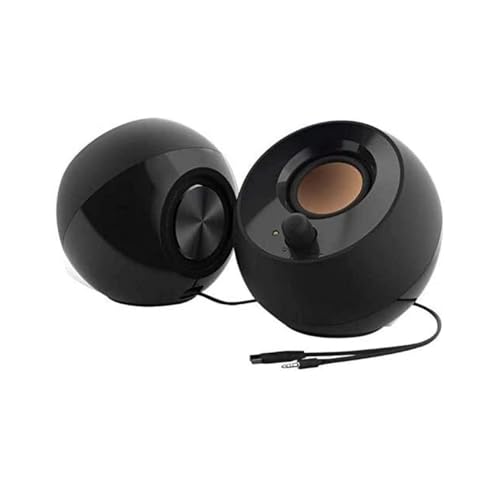
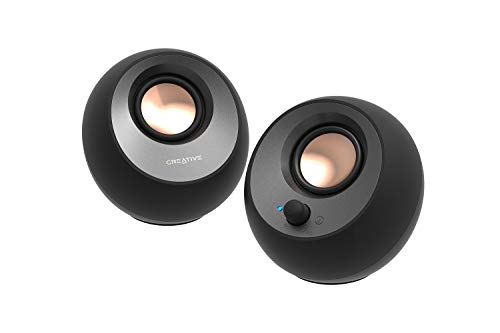
The T100 is a slim two-speaker set built around a full-range driver in each cabinet. The maker lists a compact driver per side (sources describe it as a 2.75-inch full-range unit) with a built-in digital amplifier, up to 40 W RMS, and a bass-port design meant to avoid needing a subwoofer. Frequency response figures differ between sources, so check the maker page.
The strength is connection variety. The maker lists Bluetooth 5.0, a 3.5 mm input, an optical input and a USB port that plays audio files from a flash drive. The included remote offers sound presets for movies, music, concert and gaming plus bass and treble adjustment.
Reviewers report that wired listening sounds clean and balanced, and that Bluetooth adds enough delay that watching video over wireless is less satisfying. If you plan to watch films, use the optical or 3.5 mm connection.
Each speaker measures 208 by 93 by 130 mm according to the maker, so two of them fit beside a monitor without crowding a 24 or 27-inch screen. It is sold in black only.
Edifier G2000: the gamer’s pick at the cap
The G2000 belongs to Edifier’s Hecate gaming line. The maker lists 8 W + 8 W RMS, with peak figures that differ between listings, a 2.75-inch full-frequency driver, and a frequency range from 98 Hz to 20 kHz. Inputs are Bluetooth, a USB sound card and 3.5 mm aux. There are three sound modes (music, game and movie) and 12 lighting effects, controlled by a button on the speaker, which can also be turned off.
Two practical points matter. First, the speaker-to-speaker cable is 180 cm and the power cord is 130 cm, and the maker says neither is detachable, so measure your desk before buying. Second, the 98 Hz low limit means very little deep bass. Buyers who read user feedback on the maker’s store describe clear vocals and easy setup, with a few finding the bass thin. That is consistent with the spec: this is a desktop-near-field speaker, not a room-filler.
Logitech Z313: bass on a budget
The Z313 is a long-running 2.1 system. The maker lists 25 W RMS and 50 W peak in total: 15 W for the subwoofer and 5 W for each satellite. Input is a 3.5 mm cable, and a wired control pod handles power and volume and holds a headphone jack. The maker notes that the pod’s volume knob does not change the headphone level.
It is the pick if you want physical bass without spending much. The satellites are about 146 mm tall and the subwoofer about 228 mm tall, weighing 2.3 kg. You need floor or under-desk space for the sub. The trade-offs are no Bluetooth and no USB or optical input, so a laptop with only a headphone jack works, while a source that offers only digital audio needs an adapter.
Edifier R1280DB: the step-up bookshelf pair
The R1280DB is included because it appears often in value discussions and has a different character. The maker lists 21 W + 21 W RMS, two 4-inch mid-bass drivers, a 0.5-inch silk-dome tweeter in each cabinet, optical, coaxial, dual RCA and Bluetooth 5.1 inputs, and a 55 Hz to 20 kHz response. The cabinets are MDF, and the speakers have side-panel bass, treble and volume controls plus a remote. Each is 146 by 234 by 196 mm and the pair weighs about 4.9 kg.
This is the set for people who care more about sound than size. On the maker’s own store it is listed above the budget in this guide, so it appears here as the upgrade path rather than a strict under-$100 pick.
What to look for before you buy
Connections
A USB input lets the speaker act as its own sound card, which helps when the computer’s built-in output is noisy. Optical keeps the signal digital. A 3.5 mm input works with anything. Bluetooth is convenient for phones but is the weakest option for video sync on these budget models.
Power ratings
Peak watts are marketing-friendly, RMS watts are closer to usable output. Compare RMS to RMS. A desk pair at 8 W RMS is plenty for near-field listening at normal volume; larger rooms call for higher numbers.
Size and placement
Measure the gap beside your monitor and the depth of your desk. Place the speakers at ear height, angled toward you, and keep them a little away from the wall so any rear port can breathe. Keep subwoofers off shared desk surfaces if you notice vibration.
Care and safety
Use the supplied power adapter, keep vents clear, and unplug during storms. Wipe with a dry cloth. Follow the maker’s manual for cleaning, and do not place drinks over the controls.
Budget tiers
- Budget: The Logitech Z313 and similar wired 2.1 sets give bass and simplicity but few inputs.
- Mid-range near the cap: The Creative T100 and Edifier G2000 add Bluetooth, USB and presets in a compact body.
- Premium step-up: The Edifier R1280DB moves toward fuller sound at a higher outlay.
Pick X if…
| If you want… | Pick | Why |
|---|---|---|
| One set for music, TV and the occasional game | Creative T100 | Optical, USB, 3.5 mm and Bluetooth plus a remote |
| Lighting and a built-in USB sound card | Edifier G2000 | Twelve lighting effects, three sound modes, USB audio |
| Real subwoofer bass without much outlay | Logitech Z313 | 25 W RMS total with a separate sub |
| Fuller sound and several sources | Edifier R1280DB | Larger drivers and optical, coaxial and RCA inputs |
| Almost no desk footprint | A soundbar such as Creative Sound Blaster GS3 | Maker lists a 410 mm bar with USB, Bluetooth 5.4 and aux |
Alternatives worth considering
- Creative Sound Blaster GS3: a compact soundbar. The maker lists 2 x 6 W RMS, USB audio, Bluetooth 5.4, an aux input and a headphone output in a bar about 410 mm wide. Good if the desk is shallow.
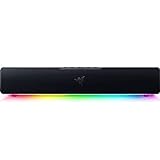
- Razer Leviathan V2 X: a USB-C powered soundbar. The maker lists two full-range drivers, two passive radiators, Bluetooth 5.0, 14 lighting zones and a 400 mm length.
- Headphones or a headset: if you share a room or work late, a good pair avoids the speaker question altogether.
Frequently Asked Questions
Do I need a subwoofer for a computer desk?
Not always. A 2.0 pair with a bass port handles music and video at desk volume, and many buyers are satisfied. A subwoofer adds weight to explosions and bass lines, but it needs space and can annoy neighbours at high volume.
Is USB audio better than a 3.5 mm cable?
USB can bypass the computer’s analog output, which helps if you hear hiss or interference. Where the speaker has its own USB sound card, it can also keep volume control tied to the speaker. For casual listening, the difference is small.
Why do Bluetooth speakers lag with video?
Bluetooth adds delay while it encodes and sends sound, and basic codecs add more. Several of these models list only the basic SBC codec. Use a wired or optical link when you watch movies or play games.
What does RMS power mean?
RMS is a measure of sustained output, while peak figures describe short bursts. When comparing models, look at RMS first. A higher number usually means more headroom, not automatically better sound.
Can I connect these speakers to a TV or console too?
Often yes, if the speaker has an optical or 3.5 mm input that matches the TV or console output. Check the connections listed in the manual for your TV before you buy, since some sets drop the audio output on certain ports.
How should I place desktop speakers?
Aim them at your ears, form roughly an equilateral triangle with your head, and keep them clear of walls and monitor stands that muffle the sound. Follow the maker’s manual for the placement of any rear port.