We independently review everything we recommend. When you buy through our links, we may earn a commission. As an Amazon Associate we earn from qualifying purchases.
Best Studio Monitors for Home Listening: 5 Warm Picks
Find studio monitors that sound warm and musical at home. Compare five pairs built for easy listening, simple connections, and living-room use.
Find studio monitors that sound warm and musical at home. Compare five pairs built for easy listening, simple connections, and living-room use.
Studio monitors have quietly moved out of the control room and into the living room. A good pair brings the clarity and detail of pro audio to everyday music, and the best ones for home listening do it without demanding a mixing desk, an audio interface, or a degree in acoustics. This guide looks at studio monitors through a listener’s lens: pleasing musical tuning, simple connections, a remote or easy volume control, and looks that sit happily beside a sofa or on a desk.
Every pick below is a powered monitor, so no separate amplifier is needed. Plug in a phone, a laptop, a turntable preamp, or a TV and press play. The focus here is enjoyment, not mix translation. If a monitor sounds warm and inviting with the music you love, it earns its place, even if a mixing engineer would reach for something flatter.
Disclosure: As an Amazon Associate, we earn from qualifying purchases.
Quick Picks
Best all-rounder for a desk: Edifier MR4 — a compact pair with a dedicated Music mode for casual listening.
Easiest living-room setup: Edifier R1280DBs — Bluetooth, optical input, subwoofer output, and a wireless remote.
Widest sweet spot: JBL 305P MkII — a waveguide design that keeps the stereo image steady as you move around the room.
Deepest bass without a subwoofer: Kali Audio LP-6 V2 — a 6.5-inch woofer that reaches low enough for most music on its own.
Best tiny desk pair: PreSonus Eris E3.5 — small cabinets with tone controls that tame bright or boomy corners.
Monitor
Woofer
Power
Bluetooth
Remote
Sold as
Edifier MR4
4 inch
42W pair
No
No
Pair
Edifier R1280DBs
4 inch
42W RMS
Yes
Yes
Pair
JBL 305P MkII
5 inch
82W each
No
No
Single
Kali Audio LP-6 V2
6.5 inch
80W each
No
No
Single
PreSonus Eris E3.5
3.5 inch
50W pair
No
No
Pair
How to Choose
Put musical character first. For home listening, the goal is a sound you enjoy for hours, not a sound that exposes every flaw in a recording. Look for monitors described as warm, smooth, or musical, with a gentle treble and a full midrange. A monitor with a switchable listening mode, tone controls, or a forgiving treble is a better living-room companion than one built to be ruthlessly revealing.
Match the woofer to the room. A 3.5-inch or 4-inch woofer suits a desk or a small room and keeps the cabinets compact. A 5-inch woofer fills a medium living room with more ease. A 6.5-inch woofer moves enough air for larger spaces and for bass-heavy music, and it often removes the need for a separate subwoofer. A large monitor crowded against a wall can sound boomy, while a small pair placed well can sound open and clean.
Count the inputs you will actually use. Bluetooth is the easiest way to play music from a phone, and it turns a monitor pair into a living-room speaker in seconds. An optical input connects directly to a TV or a game console for clean digital sound. RCA inputs suit a turntable preamp, a CD player, or a streamer. Balanced XLR and TRS inputs matter when you connect pro gear, but for home listening they are a bonus rather than a must. A subwoofer output is worth having if you think you may add bass later.
Check the volume control. A front volume knob, a wireless remote, or side-mounted dials make daily use far more pleasant than reaching around the back of a cabinet. If the pair has no remote, place the powered speaker nearest your seat.
Think about looks and placement. Wood-finish cabinets blend into a living room; black cabinets disappear against a dark desk or TV unit. Front-facing bass ports are friendlier when a speaker must sit close to a wall, since a rear port needs breathing room. Give each monitor a little space from the wall, angle them slightly toward your seat, and keep the tweeters near ear height for the clearest sound.
Pairs versus singles. Some monitors sell as a complete pair with one powered cabinet and one passive cabinet. Others sell singly, so you buy two for stereo. Check the listing carefully before ordering, and budget for two singles when the listing says sold individually.
Best Studio Monitors for Home Listening
1. Edifier MR4
Top Pick
1. Edifier MR4
Best for: a desk or small room where you want one compact pair that can sound both honest and relaxed at the flick of a switch.
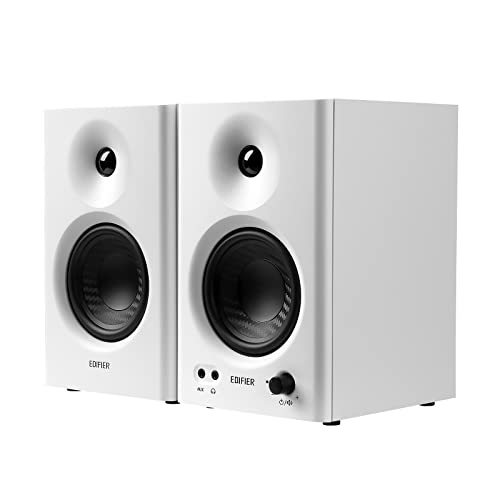
The Edifier MR4 is a compact powered pair that feels made for a desk that doubles as a listening spot. Each cabinet holds a 4-inch woofer and a 1-inch silk dome tweeter, driven by a 42W Class-D amplifier across the pair. The headline feature for home listening is a dual-mode design: a Monitor mode for honest sound and a Music mode that softens the presentation for relaxed listening. Switching to Music mode is the simplest way to make a long evening of albums feel easy on the ears.
Connectivity covers the daily basics with RCA, balanced TRS, and AUX inputs, plus a front headphone output for late-night sessions. The MDF cabinets look tidy in black or white, and the front-panel controls keep volume and tone within reach. Deep sub-bass is limited at 60Hz, so bass-heavy tracks will not shake the floor, but the midrange stays clear and the treble stays smooth.
Watch out for: no Bluetooth and no remote, so phone listening needs a cable or a separate Bluetooth receiver, and deep bass below 60Hz is limited.
2. Edifier R1280DBs
Runner-Up
2. Edifier R1280DBs
Best for: a living room or bedroom where Bluetooth, a TV connection, and a remote matter more than raw output.
a living room or bedroom where Bluetooth, a TV connection, and a remote matter more than raw output.
Watch out for
the 4-inch woofers will not deliver deep sub-bass on their own, so add a subwoofer through the sub-out port if you listen to a lot of bass-heavy music.
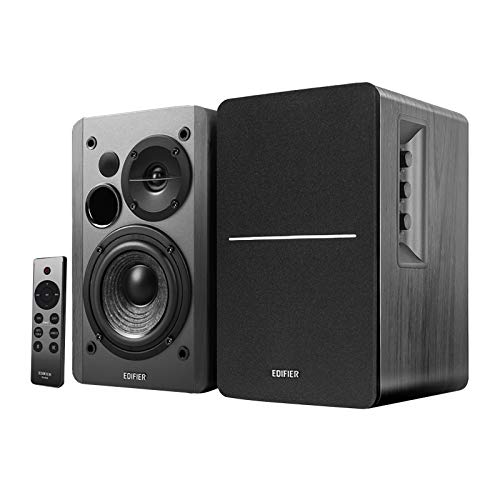
The Edifier R1280DBs is the easiest monitor in this guide to live with. It is a powered bookshelf pair with Bluetooth 5.0, optical and coaxial digital inputs, dual RCA inputs, and a subwoofer output, so a phone, a TV, a turntable preamp, and a streamer can all stay connected at once. A wireless remote handles volume, mute, input switching, and Bluetooth pairing from the sofa.
Each cabinet carries a 4-inch woofer and a 13mm silk dome tweeter, with 42W RMS across the pair and side-mounted dials for volume, bass, and treble. The classic wood-finish MDF enclosure suits a living room far better than a plain black studio box, and the removable mesh grille lets you choose between a clean fabric face and exposed drivers. Frequency response runs from 51Hz to 20kHz, which covers the heart of most music with a pleasing fullness.
Watch out for: the 4-inch woofers will not deliver deep sub-bass on their own, so add a subwoofer through the sub-out port if you listen to a lot of bass-heavy music.
3. JBL 305P MkII
3. JBL 305P MkII
Best for: listeners who move around the room and want a wide, stable stereo image with strong dynamics.
The JBL 305P MkII brings a famous waveguide design into a home listening setup. The patented Image Control Waveguide widens the sweet spot, so the stereo image stays stable when you lean back, shift across the sofa, or listen from a chair that is not perfectly centered. That forgiveness is a real advantage at home, where the listening seat is rarely a fixed studio chair.
Each cabinet holds a 5-inch woofer and a 1-inch tweeter, bi-amplified by dual 41W Class-D amplifiers for 82W per speaker. Frequency response runs from 49Hz to 20kHz, and the Slip Stream port keeps bass clean at higher volumes. Inputs are balanced XLR and TRS, which connect neatly to an interface or a streamer with balanced outputs, and the sleek black cabinet looks at home beside a TV or on a desk. Note that this monitor is sold singly, so order two for a stereo pair.
Watch out for: no Bluetooth, no remote, and no RCA input, so a phone or TV needs an adapter or a streamer; also remember it is sold singly.
4. Kali Audio LP-6 V2
4. Kali Audio LP-6 V2
Best for: a larger room or bass-heavy listening where you want deep, full sound from the monitors alone.
Woofer: 6.5 inch
Tweeter: 1 inch soft dome
Power: 80W per speaker, 40W plus 40W Class-D
Frequency response: 47Hz to 20kHz, plus or minus 3dB
The Kali Audio LP-6 V2 is the pick for listeners who want full-range sound without adding a subwoofer. Its 6.5-inch woofer and 1-inch soft-dome tweeter reach down to 47Hz within 3dB, which covers the bass of most music cleanly, and the 80W Class-D bi-amp design delivers up to 115dB maximum output for a large room. A front-facing port means the cabinet can sit closer to a wall than a rear-ported design, and the boundary EQ settings on the rear panel help when a desk sits against a wall.
The 3-D Imaging Waveguide spreads the sound evenly across the listening area, and the low-noise design keeps hiss down at quiet volumes, which matters for late-night listening. Inputs include balanced XLR and TRS plus unbalanced RCA, so it connects to almost any source. This monitor is sold singly, so order two for stereo. Its larger cabinet needs more shelf or desk space than the compact pairs in this guide, but the payoff is a bigger, deeper sound.
Watch out for: no Bluetooth and no remote, and the cabinet is larger than the other picks, so measure your shelf or desk space first.
5. PreSonus Eris E3.5
5. PreSonus Eris E3.5
Best for: a small desk or bedroom where space is tight and you want tone controls to tame a tricky corner.
The PreSonus Eris E3.5 is the smallest pair in this guide, and the best fit for a tight desk. Each cabinet is just 162 x 141 x 210 mm, yet the pair still delivers a 3.5-inch woven composite woofer and a 1-inch silk dome tweeter per side, driven by 50W of Class AB amplification across the pair. Rear High and Low acoustic tuning knobs let you trim the treble or bass by up to 6dB, which is genuinely useful when a desk sits in a corner or against a bare wall.
Inputs include balanced TRS, RCA, and a front AUX jack, and a front headphone output makes late-night listening simple. The sound is clean and easy, with a smooth treble that suits long sessions, though bass rolls off below 80Hz, so deep lows are limited. For a bedroom desk, a small office, or a first pair of monitors, the Eris E3.5 gives you the monitor experience in the smallest footprint here.
Watch out for: bass rolls off below 80Hz, so deep lows need a subwoofer, and there is no Bluetooth or remote.
Which One Fits
Choose the Edifier R1280DBs if your monitors will live in a living room: Bluetooth, optical TV input, and a remote cover the daily routine with the least fuss. Choose the Edifier MR4 if you want a compact desk pair that can switch between honest and relaxed sound. Choose the JBL 305P MkII if you move around while you listen and want the stereo image to hold together from more than one seat. Choose the Kali Audio LP-6 V2 if your room is larger or your music is bass-heavy and you want full-range sound without a subwoofer. Choose the PreSonus Eris E3.5 if your desk is small and you value tone controls and a tiny footprint over deep bass.
Between the two Edifier pairs, the deciding question is simple: do you want a remote and Bluetooth? If yes, pick the R1280DBs. If you listen at a desk with a wired source and prefer a switchable Music mode, pick the MR4. If you are torn between the JBL and the Kali, think about room size: the JBL suits a desk or medium room, while the Kali suits a larger space and deeper bass.
Common Mistakes
Buying one single when you need a pair. The JBL 305P MkII and the Kali LP-6 V2 are sold singly. A single cabinet plays in mono, so check the listing and order two for stereo. The Edifier and PreSonus pairs in this guide arrive as a complete set.
Pushing monitors hard against the wall. Rear-ported cabinets need a few inches of breathing room, or the bass turns boomy and muddy. Pull them out a little, or choose a front-ported design like the Kali LP-6 V2 when space is tight.
Skipping the remote question. A pair without a remote sounds the same as one with a remote, but daily use is very different. If you listen from a sofa, a remote or a front volume knob is worth more than a small spec advantage.
Chasing deep bass from a tiny woofer. A 3.5-inch or 4-inch monitor cannot move the air a 6.5-inch woofer can. If deep bass matters to you, pick a larger woofer or plan for a subwoofer through a sub-out port, rather than turning the bass knob all the way up and distorting the sound.
Judging a monitor by its first hour. New speakers often sound tight and bright until the drivers loosen up with use. Give a new pair a few days of normal listening before judging the tuning, and try small placement changes first.
FAQ
Can I use studio monitors as regular home speakers?
Yes. A powered studio monitor is a self-contained speaker, so it works with a phone, laptop, TV, or turntable preamp just like any powered speaker. The main difference is the connection: many monitors use balanced XLR or TRS inputs, so you may need an adapter cable for a phone or TV, while pairs with Bluetooth or RCA inputs connect directly.
Do I need a subwoofer with studio monitors?
It depends on the woofer size and the music you love. A 6.5-inch monitor like the Kali LP-6 V2 reaches low enough for most music on its own. Smaller 3.5-inch and 4-inch monitors roll off sooner, so a subwoofer adds real depth for bass-heavy music and films. If your pair has a subwoofer output, adding one later is simple.
Are studio monitors too revealing for casual listening?
Some are, but the picks in this guide are chosen for pleasing musical character rather than ruthless detail. Models with a Music mode, tone controls, or a smooth treble are easy to listen to for hours. If a monitor sounds harsh with your favorite albums, try trimming the treble or switching to a warmer listening mode before deciding it is not for you.
How far apart should I place studio monitors at home?
A good first step is to place the two speakers and your seat in a triangle, with both speakers angled slightly inward. Keep the tweeters near ear height, give rear-ported cabinets a few inches from the wall, and adjust by ear from there. Small moves of a few inches can change the sound more than any setting on the back panel.
A
admin
We compare specs, materials and verified owner reviews before a product earns a spot. Rankings are never paid.
Affiliate disclosure. As an Amazon Associate we earn from qualifying purchases at no extra cost to you. Prices accurate as of the date shown.


 4. Kali Audio LP-6 V2
 5. PreSonus Eris E3.5