Key takeaways
- Find the best conference microphone for meetings and calls, from portable speakerphones to USB desk units, with clear pickup for every voice in the room.
A laptop microphone sits a long way from the people around a table, and that distance shows up on every call. Voices from the far end sound thin, two people talking at once turn into a blur, and the remote side keeps asking everyone to repeat themselves. A conference microphone fixes the geometry by putting the pickup point in the middle of the table.
The five picks below are speakerphones with built-in microphones, not headset mics or podcast mics. Each one captures voices from all sides of a table and plays the remote side back through its own speaker, so a small group can join a call without passing a laptop around. Some run on battery and travel in a bag, one plugs into a USB port and stays on a desk. Pick by room size first, then by connection type, and confirm the exact listing before ordering.
As an Amazon Associate, we earn from qualifying purchases.
Quick Answer
For most people, the Jabra Speak 510 (2025 Edition) is the safest all-round pick: portable, with 360-degree pickup, USB and Bluetooth, and up to 15 hours of talk time. The Anker PowerConf S3 suits larger rooms with six microphones and 24 hours of talk time. The Anker PowerConf S330 is the simplest desk pick, the Poly Sync 20 fits personal workspaces, and the Yealink CP900 suits six-person rooms.
How to Choose a Conference Microphone for Meetings and Calls
Room size decides almost everything. A speakerphone built for four people will struggle in a room of eight, because its microphones cannot reach the far chairs. Count the seats at the table, then choose a device whose pickup range covers that many people. A portable unit with 360-degree pickup works well for a huddle of two to six, while a larger room needs a device with more microphones or a daisy-chain option.
Connection type comes next. Bluetooth and a built-in battery let you place the device in the middle of the table and move it between rooms, which matters for hybrid workers who call from different desks. A USB-only device is simpler and never needs charging, but it stays tethered to one computer and will not work with a phone or tablet. Check the cable in the box: some models ship with USB-C, some with USB-A, and some include a wireless dongle.
Noise handling separates the good picks from the frustrating ones. Look for echo cancellation and noise reduction, because a speakerphone that feeds its own speaker back into its microphones will echo on every call. A mute button you can find without looking matters, and a light that shows mute status stops you talking for a minute before realising nobody can hear you. Platform certification matters too: Teams and Zoom certifications mean the device passed that platform’s own checks.
1. Jabra Speak 510 (2025 Edition)

The Jabra Speak 510 (2025 Edition) is the portable pick for people who take calls from different rooms. This round speakerphone has a 360-degree omnidirectional microphone in the middle and a speaker underneath. It connects by USB or Bluetooth, pairs with two devices at once, and runs for up to 15 hours on its built-in battery.
Pickup covers meetings of up to four people around a table. Echo cancellation and digital signal processing keep voices clear, and wideband audio keeps speech natural rather than thin. Call controls sit on top: answer, end, mute, and volume, all as physical buttons you can press without looking.
This is the 2025 edition, model 7510-209-01, which replaces the older Speak 510 listing. Confirm the listing says 2025 Edition before ordering, because the older listing is discontinued and still appears in search results.
Specs
- Model: 7510-209-01
- ASIN: B0FC3XV5DK
- Microphone: 360-degree omnidirectional, echo cancellation
- Talk time: up to 15 hours
- Connections: Bluetooth and USB
- Weight: 195 grams
- Dimensions: 120 x 120 x 33 mm
- Room size: up to 4 people
- Warranty: 2 years
2. Anker PowerConf S3
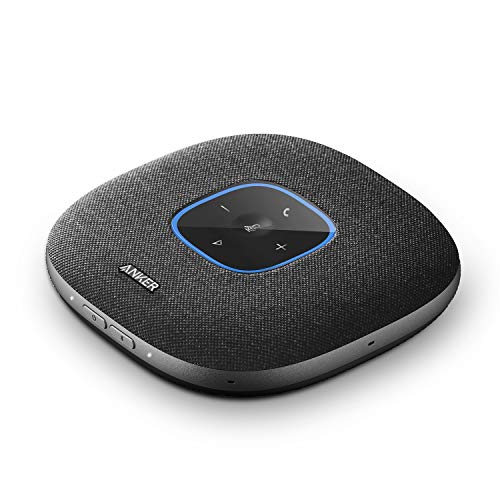
The Anker PowerConf S3 is the pick for larger rooms where more voices need to reach the microphone. Six microphones sit in an array around the unit and pick up voices from every direction, with voice enhancement that balances quiet and loud speakers so everyone sounds similar to the remote side. Call time runs up to 24 hours on a single charge, the longest in this guide.
It connects by Bluetooth 5 or USB-C, and the Anker app lets you adjust settings and update firmware from a phone. The S3 is Zoom certified, and it also works with Teams, Google Meet, and other platforms through the computer.
Confirm the listing and stock before ordering: one crawl showed no featured offers available, so availability can vary. Check that the listing names model A3302, because the original PowerConf with model A3301 is a different listing.
Specs
- Model: A3302
- ASIN: B0899S421T
- Microphones: 6 with 360-degree pickup
- Talk time: up to 24 hours
- Connections: Bluetooth 5 and USB-C
- App control: through the Anker app
- Certification: Zoom certified
- UPC: 194644034221
3. Poly Sync 20 USB-A

The Poly Sync 20 USB-A is the personal workspace pick. It is a slim bar-shaped speakerphone for one person at a desk who wants better call audio than a laptop can give, and it also works for a small huddle of two or three people sitting close together. Noise and echo reduction keep the call clean, and a three-microphone array picks up voices from the front of the desk.
It connects by Bluetooth or USB-A cable, and a built-in battery gives up to 20 hours of talk time. The 20-watt speaker is noticeably fuller than the small speakers in most laptops, so remote voices sound present rather than distant. Touch controls along the top handle mute, volume, and call answer, with a light bar that shows call and mute status.
This pick is the USB-A version, model 217038-01. Poly also sells a USB-C version and a Sync 20+ version with a Bluetooth dongle, so confirm the listing names USB-A and the right model number before ordering.
Specs
- Model: 217038-01
- ASIN: B08M5H1HWR
- Microphone: 3-microphone array with noise and echo reduction
- Talk time: up to 20 hours
- Connections: Bluetooth and USB-A
- Speaker: 20 watts
- UPC: 017229172678
- Works with: Teams, Zoom, PC, Mac, mobile
4. Yealink CP900

The Yealink CP900 is the small meeting room pick. Six MEMS microphones use beamforming to pick up voices from all directions, with full-duplex audio so people can talk over each other briefly without the audio cutting out. It covers meetings of up to six people in a huddle room or small conference room.
It connects by Bluetooth or USB, and this listing includes the BT50 wireless dongle for a steadier Bluetooth link. Talk time runs up to 12 hours on the built-in battery, and the unit weighs about 320 grams, so it travels well in a laptop bag.
Confirm the listing and stock before ordering: the most recent crawl naming this code is around 350 days old, with no fresh stock signal since. Yealink also sells a Microsoft Teams edition of the CP900 as a separate listing, so confirm the edition matches what you need.
Specs
- Model: CP900
- ASIN: B08HJMWK99
- Microphones: 6 MEMS with beamforming and 360-degree pickup
- Talk time: up to 12 hours
- Connections: Bluetooth and USB, BT50 dongle included
- Room size: up to 6 people
- Weight: about 320 grams
- Audio: full-duplex with HD voice
5. Anker PowerConf S330
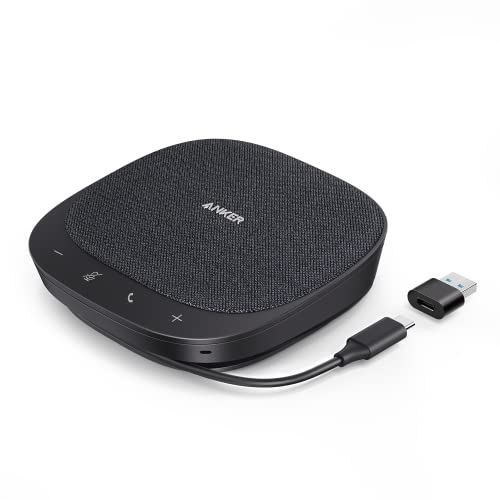
The Anker PowerConf S330 is the simplest desk pick in this guide. It is a USB-only speakerphone with no battery and no Bluetooth, which sounds like a limitation until you realise it removes everything that can run flat or drop a connection. Plug it into a computer and it works, with smart voice enhancement that lifts quiet voices and trims background sound.
The S330 uses a microphone array with 360-degree coverage for a small group around a desk, and its speaker is tuned for voice rather than music, so speech stays clear at normal volume. It is the easiest pick to set up, because there is nothing to charge, pair, or update before a call.
The trade-off is real: USB-only means it will not work with phones or tablets, and it cannot move to the middle of a table away from the computer. Buy it for a fixed desk where the computer is always the call device, and pick a battery model above if the speakerphone needs to travel.
Specs
- Model: A3308
- ASIN: B09FJ7LWX4
- Microphone: array with 360-degree voice coverage
- Connections: USB only, no Bluetooth, no battery
- Voice processing: smart voice enhancement
- Use: desk-bound calls from a computer
- UPC: 194644083960
- Ships from: Amazon
Who Should Skip
Skip a conference speakerphone entirely if you always take calls alone with headphones on, because a headset microphone sits closer to your mouth and picks up less room sound. A speakerphone earns its place when two or more people share one device.
Skip the battery models if the speakerphone will live on one desk forever and never travel: a USB-only unit like the PowerConf S330 never needs charging and has one less thing to fail. Skip the larger room picks if your meetings are always one or two people, because a six-microphone array in a quiet room adds little over a three-microphone personal unit.
Finally, skip any listing that does not name the exact model and code in this guide: a similar name with a different code can mean a different connection type, a missing dongle, or an older generation.
FAQ
Can one conference microphone cover a whole meeting room?
It depends on the room. The picks in this guide cover huddles and small rooms of up to six people. A large boardroom needs a daisy-chained pair of speakerphones or a ceiling microphone system.
Do conference microphones work with Zoom, Teams, and Google Meet?
Yes. Every pick here works with all major platforms through the computer’s audio settings, because the computer treats the speakerphone as its microphone and speaker. Certification, such as the PowerConf S3’s Zoom certification, means the device passed that platform’s own checks.
Is Bluetooth or USB better for a conference microphone?
Bluetooth lets you place the speakerphone in the middle of the table and move it between rooms, but it needs charging and can drop out. USB is steadier and never needs charging, but it tethers the device to one computer. For a fixed desk, USB is simpler; for shared rooms, Bluetooth earns its keep.
Why does the listing I found show a different model number?
Conference speakerphones come in many variants: USB-A versus USB-C, with or without a dongle, UC versus Teams editions, and older versus newer generations. Each variant has its own listing and code, so match the model number and ASIN in this guide to the listing before ordering.
Final Verdict
The Jabra Speak 510 (2025 Edition) is the best conference microphone for most people, because it balances portability, battery life, and pickup for small groups in one device that travels well. The Anker PowerConf S3 is the pick for larger rooms, with six microphones and the longest talk time in this guide. The Poly Sync 20 suits a personal desk, the Yealink CP900 suits a small meeting room, and the Anker PowerConf S330 is the simplest choice for a fixed desk. Whichever you choose, confirm the exact model and listing before ordering, because these devices have look-alike variants.