We independently review everything we recommend. When you buy through our links, we may earn a commission. As an Amazon Associate we earn from qualifying purchases.
Best Studio Monitors for Keyboards: 5 Picks for Clear Sound at Your Desk
Looking for the best studio monitors for keyboards? Compare 5 powered pairs and singles with TRS, XLR and RCA inputs for pianos, synths and workstations.
Looking for the best studio monitors for keyboards? Compare 5 powered pairs and singles with TRS, XLR and RCA inputs for pianos, synths and workstations.
Disclosure: As an Amazon Associate, this site may earn from qualifying purchases made through links on this page.
Playing a keyboard through small built-in speakers hides much of what the instrument can do. Piano voices lose body, synth pads lose width, and bass notes blur into a soft thump. Headphones fix the detail but cut you off from the room, and a living-room speaker is built to flatter music, not to show you what your hands are actually playing. Powered studio monitors sit in the middle: they take a line-level signal straight from your keyboard, amplify it themselves, and play it back with a flat, honest response so you hear the instrument, not the speaker’s opinion of it.
This guide covers five powered monitors that work well with keyboards: digital pianos, synths, workstations and arrangers. Every pick accepts a line-level input from a keyboard, through 1/4-inch TRS or TS, RCA, or a 3.5 mm AUX feed from the headphone jack. Every pick is powered, so no separate amplifier is needed. Four of the five are sold as matched pairs; one is sold singly, so you buy two for stereo. Woofer sizes run from 3 inches to 5 inches, which covers a small bedroom desk up to a larger practice room.
The picks below were checked against live Amazon US listings. The comparison table near the end lines them up side by side.
At a Glance
Edifier MR4 — 4-inch pair, balanced TRS plus RCA and AUX, front headphone jack. The all-round pick for most keyboard players.
JBL 305P MkII — 5-inch single, XLR and TRS, deep low end for its size. Buy two for stereo; the pick for larger rooms.
KRK RP5G5 — 5-inch pair, XLR, TRS and RCA, with rear EQ and boundary controls. The pick for players who also mix.
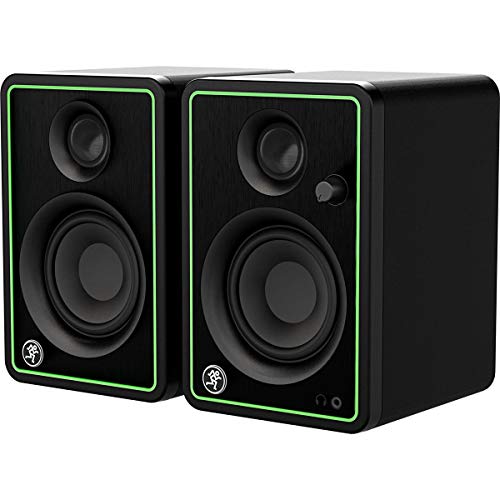
Mackie CR3-X — 3-inch pair, TRS, RCA and AUX, with a powered-side switch. The pick for tight desks and small rooms.
PreSonus Eris 3.5 Gen 2 — 3.5-inch pair, 50W Class AB, TRS, RCA and AUX. The pick for a small desk and a modest budget.
How to Choose
Woofer size and room size
Woofer size sets how low a monitor reaches and how much air it moves. A 3-inch or 3.5-inch woofer suits a small desk in a bedroom, where you sit close and the walls are near. A 4-inch woofer suits a standard desk in a medium room. A 5-inch woofer suits a larger practice room or a desk set well away from the walls, and it gives piano left-hand work and synth bass more weight. Bigger is not better in a small room: a 5-inch monitor placed against a wall can make the low end boomy, while a 3.5-inch pair at arm’s length stays clean.
Inputs: TRS, XLR, RCA and AUX
Keyboards send line-level sound, and monitors accept it in several forms. A 1/4-inch TRS input takes a balanced line from a keyboard’s main outputs. An XLR input does the same on a balanced cable. RCA inputs take an unbalanced line, which is fine for short cable runs. A 3.5 mm AUX input takes the keyboard’s headphone output, which is handy on portable keyboards that have no dedicated line outputs. Check your keyboard first: most stage pianos and synths have a pair of 1/4-inch line outputs marked L/Mono and R, while many portable models have only a headphone jack.
Balanced or unbalanced
A balanced connection (TRS or XLR) carries the signal on two wires plus ground, and it cancels hum picked up along the cable. That matters when the cable run is long, when it passes near power adapters, or when the keyboard and the monitors sit on different power strips. An unbalanced connection (RCA or TS) is fine for a short run on one desk. If your keyboard has balanced outputs, use them; if it has only unbalanced outputs, keep the cables short and route them away from power bricks.
Pair or single
Four picks in this guide are sold as matched pairs, which is what you want for stereo keyboard sound: left and right channels, each with its own amplifier and its own volume control linked through the pair. One pick, the JBL 305P MkII, is sold singly, so you buy two for a stereo pair. A single monitor works for a mono practice setup, but a keyboard’s stereo voices, effects and panning only open up with two speakers placed left and right of the player.
Placement
Place the monitors at ear height, angled toward your head, forming a triangle with your listening position. Keep them a hand’s width or more from the wall behind them when you can; a monitor hard against a wall gets a low-end lift that muddies piano tone. Keep the left and right monitors the same distance from you. If the desk is small, small isolation pads under the monitors cut down vibration passed into the desk.
Volume, tone and headphone jack
Every pick here has its own volume control and a front headphone output, which matters for late practice. Rear tone controls let you trim the high and low frequencies to suit the room: cut the lows a little if the monitors sit near a corner, or lift the highs a little if the room is heavily furnished. Set the keyboard’s own volume near its middle, then set the monitor volume to a comfortable level, so the signal stays clean from the keyboard into the speaker.
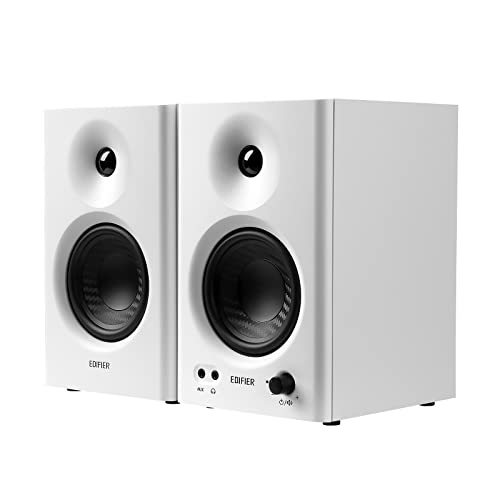
The Edifier MR4 is a 4-inch powered pair that fits most keyboard desks without a fuss. Each cabinet holds a 4-inch woofer and a 1-inch silk dome tweeter, driven by 42W RMS of built-in amplification, with a frequency response of 60 Hz to 20 kHz. The cabinets are MDF, which keeps the sound tight and the pair solid on a desk.
Connections cover every keyboard output you are likely to meet: balanced 1/4-inch TRS inputs, RCA inputs, and a 3.5 mm AUX input for a headphone jack feed. A front-panel headphone output and volume knob sit within reach, and rear controls trim the high and low frequencies to suit the room. The powered unit carries the volume control for both.
For piano practice, the MR4 gives left-hand chords a clear body without the low end running away, and for synths it keeps pads and leads distinct rather than smeared. It is the all-round pick in this guide: the woofer is large enough for a medium room, the inputs cover balanced and unbalanced keyboards, and the front headphone jack covers quiet practice. The main thing to confirm on the listing is the finish you want, since the pair is sold in more than one color.
The JBL 305P MkII is sold singly, so buy two for a stereo pair. Each unit holds a 5-inch woofer and a 1-inch tweeter, driven by 82W of built-in amplification split between the low and high drivers, with a frequency response of 43 Hz to 24 kHz. That low-end reach is the deepest in this guide, and it shows on piano bass notes and synth sub tones.
Inputs are balanced XLR and 1/4-inch TRS, which suits keyboards with balanced main outputs and longer cable runs. Rear controls include a boundary EQ that trims the low end when the monitor sits near a wall, and a high-frequency trim for bright or damped rooms. The waveguide around the tweeter widens the sweet spot, so the stereo image holds together when you shift in your seat.
This is the pick for a larger room, or for a player who wants the low end of a 5-inch woofer without moving to a subwoofer. The trade-off is the single-unit listing: the listing is for one monitor, so a stereo setup needs two units, two cables, and two power outlets. If your desk is small, the 5-inch cabinet may crowd the keyboard; measure the desk before ordering.
The KRK RP5G5 is a 5-inch powered pair built for players who also record and mix. Each cabinet holds a 5-inch woofer and a 1-inch tweeter, driven by 82W of built-in amplification, with a frequency response of 43 Hz to 40 kHz. The pair is sold as two units, so stereo is covered in one listing.
Inputs cover XLR, 1/4-inch TRS and RCA, which takes balanced keyboard outputs, unbalanced outputs, and a feed from an audio interface without swapping cables. The rear panel carries 25 boundary and EQ combinations, so you can tune the pair to a desk against a wall, a corner, or open space.
For keyboard work, the RP5G5 keeps dense synth layers distinct and gives piano voices a firm low end without boom. The tuning controls are the reason to pick it over a simpler pair: if your room is awkward, the EQ combinations let you pull the pair back into line instead of living with a muddy corner. The 5-inch cabinets are the largest in this guide, so check desk space first.
The Mackie CR3-X is a 3-inch powered pair for tight desks and small rooms. Each cabinet holds a 3-inch woofer and a 0.75-inch tweeter, driven by 50W of built-in amplification, with a frequency response of 80 Hz to 20 kHz. The pair is compact enough to sit on either side of a laptop or a small keyboard without crowding the keys.
Inputs cover 1/4-inch TRS, RCA and 3.5 mm AUX, so it takes a keyboard line output or a headphone jack feed. A front headphone output and volume knob sit on the powered unit, and a switch on the rear chooses which side of the desk the powered speaker sits on, which helps when the power outlet is on one side only. The cabinets are MDF with a brushed-metal front panel.
This is the pick when desk space is the limiting factor, or when the room is small enough that a larger woofer would overwhelm it. The 3-inch woofer does not reach as low as the 4-inch and 5-inch picks, so deep piano bass and synth sub tones are lighter, but the midrange stays clear, which is where most keyboard voices live. Confirm the listing shows the pair in the configuration you want before ordering, since the same model family is sold in several finishes.
The PreSonus Eris 3.5 Gen 2 is a 3.5-inch powered pair that suits a small desk and a modest budget. Each cabinet holds a 3.5-inch woofer and a 1-inch silk dome tweeter, driven by 50W of Class AB amplification, with a frequency response of 80 Hz to 20 kHz. The pair is sold as two units with a speaker cable between them.
Inputs cover balanced 1/4-inch TRS, RCA and 3.5 mm AUX, so it takes a keyboard line output or a headphone jack feed. A front headphone output and volume knob sit within reach, and rear controls tune the high and low frequencies to the room. The cabinets are compact, and the pair fits on a desk alongside a 61-key keyboard without pushing the monitors to the edges.
For everyday practice, the Eris 3.5 Gen 2 gives piano and synth voices a clean, even presentation, and the Class AB amplification keeps the sound smooth at low volume, which is where most practice happens. It does not reach as low as the 5-inch picks, so players who lean on deep bass may want a larger woofer, but for a bedroom desk it is a balanced choice that leaves room on the desk for the keyboard itself.
Comparison Table
Model
Woofer
Power
Inputs
Sold as
Low end
Edifier MR4
4 inch
42W RMS
TRS, RCA, AUX
Pair
60 Hz
JBL 305P MkII
5 inch
82W
XLR, TRS
Single
43 Hz
KRK RP5G5
5 inch
82W
XLR, TRS, RCA
Pair
43 Hz
Mackie CR3-X
3 inch
50W
TRS, RCA, AUX
Pair
80 Hz
PreSonus Eris 3.5 Gen 2
3.5 inch
50W
TRS, RCA, AUX
Pair
80 Hz
Which One Fits Your Situation
Small bedroom desk, close listening. Pick the PreSonus Eris 3.5 Gen 2 or the Mackie CR3-X. Both are compact pairs with front headphone jacks, and their smaller woofers stay clean when the walls are near. The Eris 3.5 has the edge on low-end weight; the CR3-X has the edge on desk footprint and the powered-side switch.
Standard desk in a medium room, one pair for everything. Pick the Edifier MR4. The 4-inch woofer reaches low enough for piano left-hand work, the balanced TRS inputs take a stage piano or synth output directly, and the front headphone jack covers quiet hours. It is the least fussy pick in the guide.
Larger practice room, deep low end. Pick two JBL 305P MkII units. The 5-inch woofer and 43 Hz low end give piano bass and synth sub tones real weight, and the boundary EQ tames the low end if the monitors sit near a wall. Remember the listing is for one monitor, so order two.
Playing plus recording and mixing. Pick the KRK RP5G5 pair. The 25 boundary and EQ combinations let you tune the pair to an awkward room, the XLR, TRS and RCA inputs cover keyboards and interfaces alike, and the 5-inch woofer holds up when a mix gets dense.
Keyboard with only a headphone output. Pick the Edifier MR4, Mackie CR3-X or PreSonus Eris 3.5 Gen 2, all of which have a 3.5 mm AUX input. Run a cable from the keyboard headphone jack to the AUX input, keep the keyboard volume near its middle, and set the level on the monitors.
FAQ
Can I plug my keyboard straight into studio monitors?
Yes. A keyboard’s line outputs, or its headphone output, feed directly into a powered monitor’s line inputs. Use two 1/4-inch cables for the left and right line outputs, or a single cable from the headphone jack into the AUX input. No separate amplifier is needed, since each monitor has its own built-in amplification.
Do I need an audio interface?
No, not for playing alone. An interface helps when you also want to record the keyboard into a computer, or when you want to mix the keyboard with other sources. For practice and listening, a direct cable from the keyboard to the monitors is enough.
Do I need one monitor or two?
Two, for stereo. A keyboard’s voices, effects and panning are built in stereo, and a single monitor plays only one side of that image. One monitor works for a mono practice setup, but two monitors placed left and right of the player give the full sound. Four picks in this guide are sold as pairs; the JBL 305P MkII is sold singly, so buy two.
What cables do I need?
For a keyboard with left and right line outputs, two 1/4-inch TS or TRS cables, one per channel. For a keyboard with only a headphone output, a Y-cable from the headphone jack to two 1/4-inch plugs, or a 3.5 mm cable into the AUX input. For a balanced output, use TRS or XLR cables to keep hum out of long runs.
Can I use studio monitors for everyday listening too?
Yes. Studio monitors play any line-level source, from a keyboard to a phone or a computer. They are more honest than hi-fi speakers, so a poor recording sounds poor and a good one sounds good. If you want a speaker that flatters everything, a hi-fi speaker suits that job better; if you want to hear what is actually there, a monitor is the right tool.
How far from the wall should the monitors sit?
A hand’s width or more when you can manage it. A monitor hard against a wall gets a low-end lift that muddies piano tone. If the desk must sit against a wall, use the rear boundary EQ or low-frequency trim on the monitor to pull the low end back.
Final Take
For most keyboard players, the Edifier MR4 is the pick to start with: a 4-inch powered pair with balanced TRS, RCA and AUX inputs, a front headphone jack, and enough low end for a medium room. If the room is larger and the low end matters, two JBL 305P MkII units give the deepest bass in this guide. If the desk is small, the PreSonus Eris 3.5 Gen 2 and the Mackie CR3-X both fit without crowding the keys. And if the same pair must serve playing and mixing, the KRK RP5G5 pair brings the tuning controls to make an awkward room work.
Whichever pick you choose, match the inputs to your keyboard’s outputs, place the pair at ear height with space behind them, and confirm the listing shows the pair or single unit in the configuration you want before ordering. The right pair disappears into the room and leaves only the keyboard.
B
Beckykinkead Editorial Team
We compare specs, materials and verified owner reviews before a product earns a spot. Rankings are never paid.
Affiliate disclosure. As an Amazon Associate we earn from qualifying purchases at no extra cost to you. Prices accurate as of the date shown.
Best battery telescopic hedge trimmer: four cordless pole trimmers compared for reach, blade length, cut capacity and battery platform for tall hedges.
How much is a Prius hybrid battery? It turns on generation, new or reconditioned modules, pack or module set, core exchange, and warranty. See 5 Prius packs.
How many watts does a motorcycle battery have? Cranking watts and watt-hours for 12V AGM motorcycle batteries, with five live picks and the math shown.
Can Prius be driven long term without hybrid battery? The short answer, what fails first, and five verified live Prius hybrid battery modules and sets.
Find the best portable solar chargers for RVs, from foldable 100W panels to 220W bifacial kits, with wattage, controller and compatibility guidance today.
Find the best cock extenders in this clinical guide to traction devices, adjustable rods, comfort, fit, materials, safety, and what to check before buying.
Compare the best beauty cameras for flattering selfies and tutorials, from the Sony ZV-1 to the Canon G7 X Mark III and the Fujifilm Instax Mini Evo pick.

 1. Edifier MR4
 2. JBL 305P MkII
 3. KRK RP5G5
 4. Mackie CR3-X
 5. PreSonus Eris 3.5 Gen 2