Our Short List of 3
All 4 Picks at a Glance
| Product | Specs | Action |
|---|---|---|
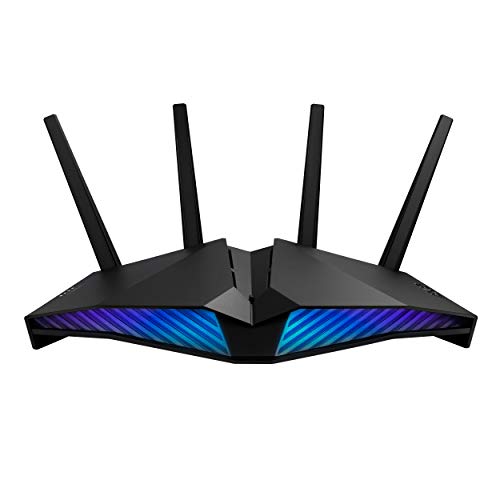 ASUS RT-AX82U | Check price on Amazon | |
 NETGEAR Nighthawk Pro Gaming XR1000 | Check price on Amazon | |
 NETGEAR Nighthawk RAXE300 | Check price on Amazon | |
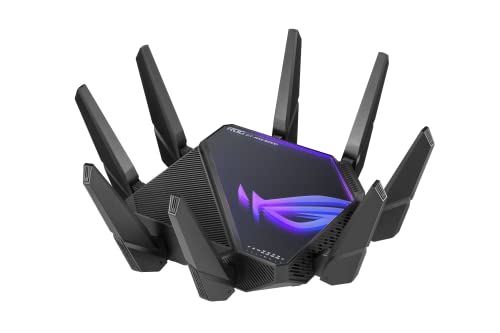 ASUS ROG Rapture GT-AXE16000 | Check price on Amazon |
Key takeaways
- Find the best LAN routers for gaming with fast wired ports, gaming QoS, and low-latency features for PC and console play.
A wired connection is still the most reliable way to play online games. Wi-Fi has improved a great deal, but a gaming PC or console plugged directly into a router with a good Ethernet port avoids the interference, congestion, and signal swings that can turn a close match into a frustrating one. The best LAN routers for gaming combine strong wired ports with software that keeps game traffic at the front of the queue, so downloads, streams, and other devices in the house do not steal bandwidth mid-match.
This guide focuses on routers built for gaming first, with wired LAN performance front and center. Every pick below is a gaming router with dedicated gaming features, multiple Ethernet ports, and traffic prioritization. The roundup covers an affordable Wi-Fi 6 option, a competitive-play specialist, a Wi-Fi 6E mid-range pick, and a flagship model for demanding setups.
At a Glance
| Product | Best for | Key spec |
|---|---|---|
| ASUS RT-AX82U | Affordable Wi-Fi 6 gaming | AX5400 dual-band, dedicated gaming port |
| NETGEAR Nighthawk Pro Gaming XR1000 | Competitive play and ping control | AX5400, DumaOS 3.0, four gigabit LAN ports |
| NETGEAR Nighthawk RAXE300 | Wi-Fi 6E on a mid-range budget | AXE7800 tri-band, 2.5 Gbps port |
| ASUS ROG Rapture GT-AXE16000 | Flagship wired and wireless speed | Quad-band Wi-Fi 6E, dual 10-gigabit ports |
How to Choose a LAN Router for Gaming
Wired LAN ports and multi-gig speeds
The wired side of a gaming router matters more than the wireless headline speed. Count the LAN ports and check their speed. A router with four gigabit LAN ports can wire a PC, a console, and a streaming box at the same time, while a multi-gig port, such as a 2.5-gigabit or 10-gigabit port, removes the gigabit ceiling for a high-end PC or a fast internet plan. If your internet plan is faster than a gigabit, a standard gigabit WAN port becomes a bottleneck before your game traffic even reaches the router, so match the WAN port to your plan. Link aggregation, offered by some models, can combine two gigabit ports into a single faster wired connection for a PC or network storage device.
Gaming traffic prioritization
Gaming traffic is small but time-sensitive. Quality of Service, usually called QoS, lets the router identify game packets and send them first. Look for gaming-specific QoS rather than generic device priority: dedicated gaming ports that automatically prioritize whatever is plugged into them, game detection that recognizes popular titles, and geo-filtering that helps you connect to closer game servers. These features matter most in busy households where someone else is streaming video or backing up files while you play.
Wi-Fi standard and bands
Even a wired-first gamer needs good Wi-Fi for phones, tablets, and handhelds. Wi-Fi 6 routers handle crowded networks better than older standards thanks to OFDMA and MU-MIMO, which let the router serve several devices at once instead of one at a time. Wi-Fi 6E adds a 6 GHz band that is far less crowded, which helps in apartment buildings and dense neighborhoods. Wi-Fi 6 is enough for most players today, while Wi-Fi 6E is worth considering if you own newer devices and want the cleanest wireless band available.
Latency tools and server control
Some gaming routers go beyond basic QoS with software built around latency. DumaOS, found on NETGEAR Nighthawk Pro Gaming models, adds a ping heatmap, a geo-filter, and bandwidth allocation per device, giving competitive players direct control over which servers they connect to and how much bandwidth each device can use. ASUS routers offer Mobile Game Mode for handheld and phone gaming, plus Adaptive QoS and port forwarding with a simplified three-step setup. These tools do not replace a good internet connection, but they help you get the most from the connection you have.
Coverage and household size
A router that covers a small apartment will struggle in a large multi-story home. Manufacturers publish coverage figures, and these are best-case numbers measured in open space, so treat them as a rough guide and expect less through walls and floors. If your gaming setup sits far from the router, look for models with strong antenna arrays and mesh support, which lets you add a compatible node later instead of replacing the whole router. A wired connection through a long Ethernet cable or a powerline adapter can also beat a weak wireless signal to a distant room.
Security and ongoing support
A gaming router is the front door to your home network, so built-in security is worth having. Lifetime network security suites, such as AiProtection Pro on ASUS models and NETGEAR Armor, scan for threats and block malicious sites for connected devices. Check that the manufacturer still issues firmware updates for the model you are considering, and install the latest firmware during setup. A router that no longer receives updates can leave your network exposed, no matter how fast it is.
ASUS RT-AX82U
The ASUS RT-AX82U is the most affordable way into a proper gaming router, and it covers the essentials well. It is a dual-band Wi-Fi 6 router with combined speeds up to 5400 Mbps, split between a 574 Mbps 2.4 GHz band and a 4804 Mbps 5 GHz band, driven by a 1.5 GHz tri-core processor. On the back, it offers four gigabit LAN ports plus a gigabit WAN port, and one of the LAN ports is a dedicated gaming port that automatically prioritizes any PC or console plugged into it, with no configuration needed.
Gaming features are the reason to choose this model over a standard router at a similar tier. Mobile Game Mode, enabled from the ASUS Router app, prioritizes traffic from a phone or handheld for a low-latency mobile session. Adaptive QoS, port forwarding, and VPN support are all included, along with Aura RGB lighting on the front vents for a setup that matches the rest of a gaming desk. AiProtection Pro provides lifetime network security, and Instant Guard offers one-click VPN protection when you are away from home. AiMesh support means the router can join or anchor a mesh network later if coverage needs to grow.
The RT-AX82U suits a player who wants real gaming features on a modest budget and games mostly on a wired connection. Its limitations are the ones you would expect at this level: all wired ports are gigabit, so there is no multi-gig port for a faster-than-gigabit plan, and it is a dual-band Wi-Fi 6 model rather than a tri-band or Wi-Fi 6E one. For a single gamer in a small to medium home, though, it delivers the core gaming experience without excess.
Pros:
– Dedicated gaming port prioritizes a wired PC or console automatically
– Mobile Game Mode for low-latency phone and handheld gaming
– Lifetime AiProtection Pro security and Instant Guard included
– AiMesh support for future mesh expansion
– Aura RGB lighting suits a gaming desk setup
Cons:
– No multi-gig wired port for faster-than-gigabit plans
– Dual-band Wi-Fi 6 only, with no 6 GHz band
– Gigabit ports only, so no link aggregation headroom beyond two gigabits
NETGEAR Nighthawk Pro Gaming XR1000
The NETGEAR Nighthawk Pro Gaming XR1000 is built for players who want control over their connection, not just speed. It is a 6-stream AX5400 Wi-Fi 6 router running DumaOS 3.0, NETGEAR gaming operating system. DumaOS adds a ping heatmap that shows server ping before you connect, a geo-filter that limits matchmaking to servers within a chosen distance, and per-device bandwidth allocation, so one device cannot hog the connection during a match. NETGEAR states that DumaOS can reduce ping rates by up to 93 percent in supported scenarios, a manufacturer claim that reflects the benefit of connecting to a closer, less congested server.
On the wired side, the XR1000 has four gigabit Ethernet LAN ports and a gigabit WAN port, plus a USB port for shared storage. The angular black chassis carries four external antennas and the familiar Nighthawk winged design, and the Nighthawk app handles setup and day-to-day management. NETGEAR Armor cybersecurity is included for connected-device protection.
The XR1000 is the pick for competitive players who notice the difference between a nearby server and a distant one and who want the tools to choose. Its wired ports are all gigabit, so it is not the right choice for a multi-gig internet plan, and its Wi-Fi 6 radios are a generation behind the Wi-Fi 6E and Wi-Fi 7 models now on the market. For a player whose priority is stable, low-latency matches on a standard gigabit connection, those trade-offs are easy to accept.
Pros:
– DumaOS 3.0 with ping heatmap, geo-filter, and bandwidth allocation
– Four gigabit LAN ports for wiring a PC, console, and more
– Designed specifically for competitive online play
– NETGEAR Armor security included
– Straightforward setup through the Nighthawk app
Cons:
– All wired ports are gigabit, with no multi-gig option
– Wi-Fi 6 only, with no 6 GHz band
– Gaming software has a learning curve for new users
NETGEAR Nighthawk RAXE300
The NETGEAR Nighthawk RAXE300 brings Wi-Fi 6E into the mid-range, and it is the most balanced pick in this roundup for a household that wants modern wireless and a fast wired port. It is a tri-band AXE7800 router with eight streams, delivering up to 574 Mbps on 2.4 GHz, up to 4804 Mbps on 5 GHz, and up to 2402 Mbps on the new 6 GHz band. A 1.7 GHz quad-core processor drives the whole package, and NETGEAR rates coverage at up to 2,500 square feet with support for up to 40 devices.
The wired side is where the RAXE300 stands out at its tier. It includes a dedicated 2.5-gigabit Ethernet port alongside gigabit LAN ports, so a gaming PC or a fast internet plan is not capped at a gigabit. A USB-C port is available for shared storage, and six high-performance antennas are hidden inside the folding Nighthawk wings, keeping the design compact for a router of this class. At 13.64 x 8.16 x 6.47 inches and 2.23 pounds, it is a substantial unit that still fits on a standard desk shelf.
One practical note: NETGEAR security advisories from the autumn of 2026 listed the RAXE300 among models receiving firmware fixes, so install the latest firmware as part of setup. The RAXE300 suits a household that wants Wi-Fi 6E for newer devices, a 2.5-gigabit wired port for a gaming PC, and solid coverage without stepping up to a flagship.
Pros:
– Wi-Fi 6E with a dedicated 6 GHz band for less crowded wireless
– 2.5-gigabit Ethernet port for a fast wired gaming PC
– Coverage rated up to 2,500 square feet for up to 40 devices
– Compact folding-wing antenna design
– Strong mid-range balance of wired and wireless performance
Cons:
– Only one multi-gig port, so only one device gets the faster wired speed
– No dedicated gaming port or DumaOS software
– Firmware updates should be installed promptly at setup
ASUS ROG Rapture GT-AXE16000
The ASUS ROG Rapture GT-AXE16000 is the flagship of this roundup, and it is aimed at players who want the fastest wired and wireless connection available in a single box. It is a quad-band Wi-Fi 6E router with combined speeds up to 16000 Mbps, including a 6 GHz band for the newest devices. Two 10-gigabit ports and a 2.5-gigabit WAN port headline the wired side, joined by four gigabit LAN ports, so a high-end PC, a console, and network storage can all be wired at full speed at the same time.
Triple-level game acceleration is the centerpiece of the gaming software, prioritizing game traffic from the device through the router to the game server. VPN Fusion lets a VPN connection and an ordinary connection run at the same time, so game traffic stays on the fastest path while other traffic uses the VPN. Dual WAN support adds a backup internet connection for households that cannot afford downtime, and AiMesh support allows the router to anchor a mesh network. The unit measures 9.9 x 9.9 x 2.3 inches and weighs 5.21 pounds, with eight external antennas and two USB ports, one of which is USB 3.0.
The GT-AXE16000 suits a demanding setup: a multi-gig internet plan, several wired gaming devices, and a player who wants every available speed and feature. It is a large, heavy router, and its capabilities exceed what most households need, so it is best viewed as a long-term investment rather than a first gaming router. For the right setup, though, nothing else in this roundup matches its wired headroom.
Pros:
– Dual 10-gigabit ports plus a 2.5-gigabit WAN port for maximum wired speed
– Quad-band Wi-Fi 6E with speeds up to 16000 Mbps
– Triple-level game acceleration and VPN Fusion
– Dual WAN support for a backup internet connection
– AiMesh support and two USB ports
Cons:
– Large and heavy at 9.9 inches square and over five pounds
– Far more capability than most households need
– Premium tier that exceeds a modest budget
Which One Fits You
Start with your internet plan and your wired devices. If your plan is a gigabit or slower and you play on one wired PC or console, the ASUS RT-AX82U covers the gaming essentials at the most accessible tier, with a dedicated gaming port and Mobile Game Mode. If you play competitively and want to choose your servers and control ping, the NETGEAR XR1000 and its DumaOS software are built for exactly that, though its ports are all gigabit.
If your plan is faster than a gigabit, or you want Wi-Fi 6E for newer devices, the NETGEAR RAXE300 is the sensible middle ground, with a 2.5-gigabit port and a 6 GHz band. The ASUS ROG Rapture GT-AXE16000 is the choice when nothing less than the fastest wired and wireless connection will do, with dual 10-gigabit ports and quad-band Wi-Fi 6E for a demanding, multi-device setup. In every case, wire your main gaming device with an Ethernet cable, keep firmware updated, and let the router QoS handle the rest.
Frequently Asked Questions
Is a wired LAN connection really better than Wi-Fi for gaming?
Yes, for the device you play on most. A wired Ethernet connection avoids wireless interference and the signal variation that comes with distance and walls, giving you a steadier connection with lower and more consistent latency.
What is a gaming port on a router?
A gaming port is a dedicated LAN port that automatically gives top priority to whatever device is plugged into it. On the ASUS models in this guide, plugging a PC or console into the gaming port moves its traffic to the front of the queue without manual QoS rules, which is useful when other devices are streaming or downloading.
Do I need a multi-gig port for gaming?
Not for the game itself, since online games use very little bandwidth. A multi-gig port matters when your internet plan is faster than a gigabit, when you download large games often, or when you move big files to network storage. A gigabit port is enough for smooth gameplay on a standard plan.
What does DumaOS do on the NETGEAR XR1000?
DumaOS is NETGEAR gaming router software. It adds a ping heatmap to preview server latency, a geo-filter to limit matchmaking to nearby servers, and bandwidth allocation controls for each device. These tools help competitive players connect to closer servers and keep other devices from crowding out game traffic.
Is Wi-Fi 6E worth it for a gaming router?
Wi-Fi 6E adds a 6 GHz band that is much less crowded than the 2.4 GHz and 5 GHz bands, which helps in apartments and dense neighborhoods. It is worth it if you own Wi-Fi 6E devices and play wirelessly part of the time. If your main gaming device is wired, Wi-Fi 6 is enough, and the wired ports matter more.
How many LAN ports do I need on a gaming router?
Four LAN ports cover most setups: a gaming PC, a console, and one or two extras such as a streaming box or network storage. If you have more wired devices, add an inexpensive network switch to one LAN port rather than buying a router with more ports, and reserve the fastest port for your main gaming device.
Conclusion
The best LAN router for gaming is the one that matches your connection and your setup. The ASUS RT-AX82U is the affordable starting point with genuine gaming features, the NETGEAR XR1000 is the competitive player’s tool with DumaOS server control, the NETGEAR RAXE300 is the balanced Wi-Fi 6E pick with a 2.5-gigabit wired port, and the ASUS ROG Rapture GT-AXE16000 is the flagship for demanding multi-gig setups. Whichever you choose, wire your main gaming device, enable the gaming QoS features, and keep the firmware current. A stable, low-latency wired connection is the foundation every good online match is built on.
Disclosure: As an Amazon Associate, we earn from qualifying purchases.